- Published on
Vue directive to prevent duplicate file downloads
- Reading time
- 3 分钟
- Page view
- -
- Author

- Name
- Yicong
- Github
Preface
In daily development work, we often encounter scenarios where we download files. Usually, after users click to download, it is necessary to prohibit repeated clicks to download to ensure that a large number of requests are not sent. When the button is disabled, a loading state is added to provide a better visual experience. The implementation in a single page is very simple: set a loading variable, and set the loading state and disabled state of the button before and after the user performs the operation. But if we write one page once, what about 10 pages or 100 pages? Therefore, we need a general method to solve this problem, and naturally we think of Vue directives.
Implementation ideas
In addition to the default built-in instructions (v-model and v-show) for core functions, Vue also allows registration of custom instructions. Note that in Vue2.0, the main form of code reuse and abstraction is components. However, in some cases, you still need to perform low-level operations on ordinary DOM elements, and then custom instructions will be used
The overall implementation is divided into two parts (Vue + Element + Axios as an example):
In axios, add a flag variable to the global to represent the download status when the file is downloaded
In the instruction, when the file download is detected, disable the button and add the loading status, and restore it to its original state when the download is completed
Implementation process
1. Global reporting of download progress
Define a function to report the download progress to the global. When the file length can be calculated, define a flag named isFileDownloading to determine whether the current file has been downloaded:
// axios.js

// Add download progress to the global
const addDownloadProgress = (progressEvent) => {
  // Only for cases where the file length can be calculated
  if (progressEvent.lengthComputable) {
    window.isFileDownloading = progressEvent.loaded !== progressEvent.total;
  } else {
    window.isFileDownloading = false;
  }
};
The request configuration of the Axios official website has an onDownloadingProgress property for handling download events
// `onDownloadProgress` allows handling of progress events for downloads
// browser only
onDownloadProgress: function (progressEvent) {
  // Do whatever you want with the native progress event
}
Progress is reported only when the interface is used to download files:
// axios.js

// Report progress to the global system when downloading files, to prevent repeated download instructions
if (conf.responseType === 'blob') {
  if (!conf['onDownloadProgress']) {
    conf['onDownloadProgress'] = addDownloadProgress;
  }
}
2. Monitor global variables and update status
Use Vue instructions, use a timer to poll the flag created in the above steps, and modify the button status according to the flag. The main code is:
// preventReDownload.js

let changeToDownloading = null;

export default {
  install(Vue) {
    Vue.directive('preventReDownload', {
      bind(el) {
        let timer = null;
        changeToDownloading = () => {
          el.disabled = true;
          el.classList.add('is-disabled', 'is-loading');
          // Poll the file download status flag added by axios to the global variable
          timer = setInterval(() => {
            if (!window.isFileDownloading) {
              console.log('done!');
              clearInterval(timer);
              el.disabled = false;
              el.classList.remove('is-disabled', 'is-loading');
              el.removeChild(el.firstChild);
            }
          }, 500);
        };
        el.addEventListener('click', changeToDownloading);
      },
      unbind() {
        document.removeEventListener('click', changeToDownloading);
      }
    });
  }
};
Complete code with circle animation:
// preventReDownload.js

// function Change the button to downloading state
let changeToDownloading = null;
// loading Animated circle
const loadingEle = document.createElement('div');
loadingEle.setAttribute('class', 'el-loading-spinner');
loadingEle.innerHTML = `
  <svg class="circular" viewBox="0 0 16 16">
    <circle class="path" cx="8" cy="8" r="7" fill="none"/>
  </svg>
`;

export default {
  install(Vue) {
    Vue.directive('preventReDownload', {
      bind(el) {
        let timer = null;
        changeToDownloading = () => {
          el.disabled = true;
          el.classList.add('is-disabled', 'is-loading');
          el.prepend(loadingEle);
          // Poll the file download status flag added to the global variable by axios
          timer = setInterval(() => {
            if (!window.isFileDownloading) {
              console.log('done!');
              clearInterval(timer);
              el.disabled = false;
              el.classList.remove('is-disabled', 'is-loading');
              el.removeChild(el.firstChild);
            }
          }, 500);
        };
        el.addEventListener('click', changeToDownloading);
      },
      unbind() {
        document.removeEventListener('click', changeToDownloading);
      }
    });
  }
};
How to use
Use the command v-prevent-re-download in the button to trigger the download interface when the button is clicked:
<el-button v-prevent-re-download type="primary" @click="onDownload">DownLoad</el-button>
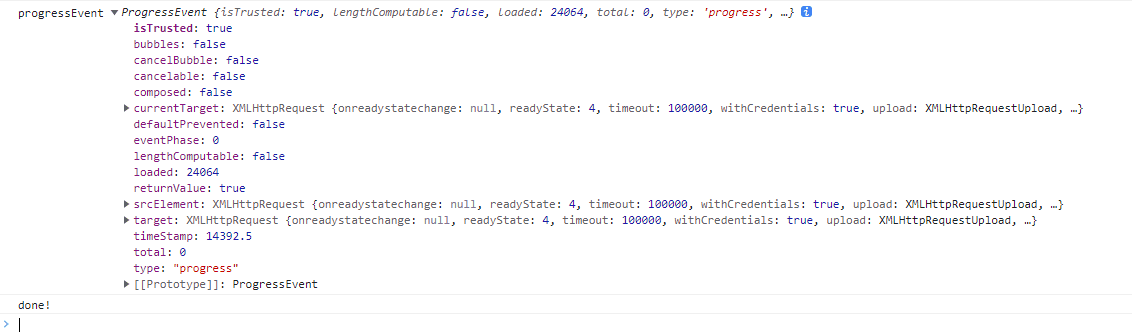
You can see that the button changes to loading and disabled states, and the console prints the download process and download completion information:

Defects
This method has some flaws:
- The code is somewhat invasive, and some modifications are made to the request encapsulation. Moreover, when the request itself has set
isFileDownloading, there will be problems, so I skipped the interface that has already set this attribute. - There are still some problems with the style of the Loading state. The buttons of the plain attribute and the table operation column buttons cannot be displayed because the circle is white. Modify this according to your needs😂
References
Vue uses instructions to implement two methods to prohibit repeated requests